What triggers an approval
The line between what requires approval and what does not is the line between observation and action. Reading data sits on one side. Taking action sits on the other.
| Does not need approval | Requires approval |
|---|---|
| Reading emails in Gmail | Sending a reply |
| Pulling order data from Shopify | Initiating a refund |
| Looking up a record in Notion | Creating or updating a record |
| Reviewing open GitHub issues | Creating a new issue |
| Summarising a meeting transcript | Sending the summary to attendees |
The agent can watch and think freely. It can only act with your sign-off.
How the approval surfaces
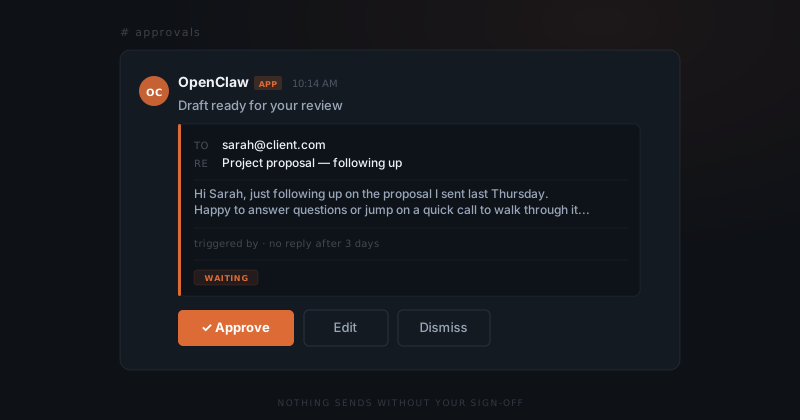
When a draft is ready, it surfaces in Slack as a structured message. The message shows the draft content — the email text, the Notion entry, the GitHub issue — the trigger context, and the requested action.
Below the draft, you have three options:
- Approve — sends or executes the action immediately
- Edit — opens a thread where you revise the content before sending
- Dismiss — cancels this instance without affecting future triggers
If you do nothing, the draft stays in place. It does not expire, and nothing happens without your input.
Scoped tool permissions
The approval flow is one half of the safety model. The other half is scoped tool access.
Each integration gets only the permissions it needs. An agent monitoring your Gmail inbox for support emails can read messages and draft replies — it cannot access your calendar or send from a different account. An agent logging feature requests to GitHub Issues can create issues in a specific repository — it cannot merge pull requests or modify repository settings.
This scoping is not advisory. The agent literally cannot take actions outside its configured permissions, regardless of what it is asked. It would surface the limitation rather than find a workaround.
This is what makes the system predictable under edge cases — not policy, but capability.
What happens when you do not respond
Nothing. Drafts wait indefinitely. The agent does not retry automatically, escalate to a default, or find another path to execute.
The waiting state is the safe state.
For time-sensitive workflows — a follow-up email that loses relevance after a few days — configure an expiry period. If you have not approved or dismissed the draft within that window, it expires. The agent logs it as unactioned. You see what expired in your activity summary. Nothing was sent.
High-risk actions and double confirmation
For higher-risk actions, you can require a second confirmation. The first approval marks it as reviewed. The second sends.
| Risk level | Example | Default |
|---|---|---|
| Low | Daily summary email to yourself | Auto-send |
| Standard | Reply to a client email | Single approval |
| High | Bulk outreach to a client list | Double confirmation |
| High | Initiating a refund | Double confirmation |
Set thresholds on the setup call. Adjust them as you build trust in the system.
The audit trail
Every agent action is logged: what was triggered, what draft was produced, whether it was approved, edited, dismissed, or expired, and when. The log is readable in Slack and exportable.
For businesses that need to demonstrate operational oversight — regulated industries, client-facing agencies with delivery accountability — the audit trail is the record. Not just that the AI did not act autonomously, but that a human reviewed and approved each action that went out.