Permission scope
Each integration connects to OpenClaw via a scoped OAuth token. That token grants exactly what the task requires — nothing more.
The Gmail connection lets the agent read incoming messages and draft replies. It cannot access Google Drive. It cannot read your calendar. It cannot send from a different account. Those permissions were never requested.
When you configure an integration, you grant only the permissions that workflow needs. A Notion integration for client reporting can create and update records in one database. It cannot browse your entire workspace.
| Integration | Permitted | Excluded |
|---|---|---|
| Gmail | Read email, draft replies | Drive, Calendar, Contacts |
| Notion | Create/update records in one database | Other databases, pages |
| Slack | Post to configured channels | DMs, other channels |
| Shopify | Pull order data | Refunds, product changes |
Narrow permissions make each integration more predictable. The agent knows exactly what it can reach — and so do you.
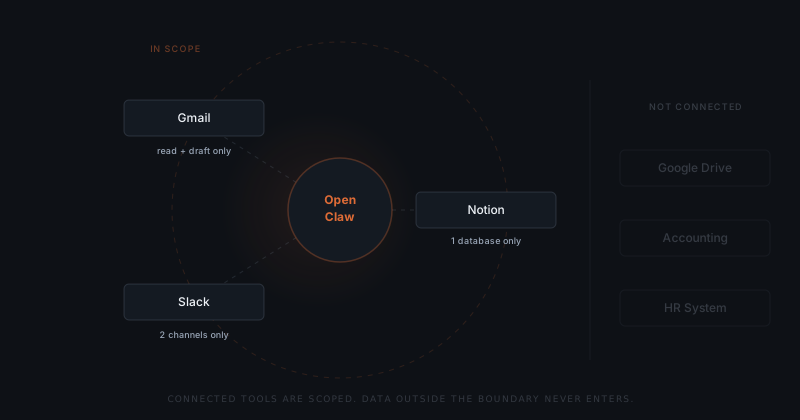
What enters the context
When OpenClaw processes a task, a defined slice of data enters the model context. Not everything the integration can technically access — just what the current task requires.
Confidentiality isn't a promise. It's a permission boundary.
When a new client email arrives, OpenClaw pulls that thread and any contact metadata you have configured. Your other open emails stay out. Your CRM does not load unless you have explicitly connected it.
The boundary is task-level, not integration-level. Even within what an integration can access, OpenClaw loads only what the current action involves.
The approval layer
OpenClaw cannot send an email, update a CRM record, or take any external action without your approval. This is enforced at the infrastructure level. The action is blocked until you release it — no setting can bypass that.
No draft sends without your sign-off. This is not a preference or a toggle — it is the only path from draft to action.
Whatever entered the context, the agent cannot act without you reviewing the draft first. The approval step is a second line of defence on top of scoped permissions.
Defining the boundary
Before deployment, you decide which data sources connect and which stay out entirely. This happens on the setup call — not by default.
If you handle financial data in a system you do not want near any AI workflow, do not connect it. OpenClaw has no access to systems outside its configured integrations. There is no ambient access to your infrastructure.
Founders in regulated industries — legal, financial services, healthcare-adjacent — often configure a tighter setup. One or two integrations, specific channels only, no CRM access. That is a valid production setup, and it covers most of the sensitive workflows a small firm needs to automate.