What every log entry contains
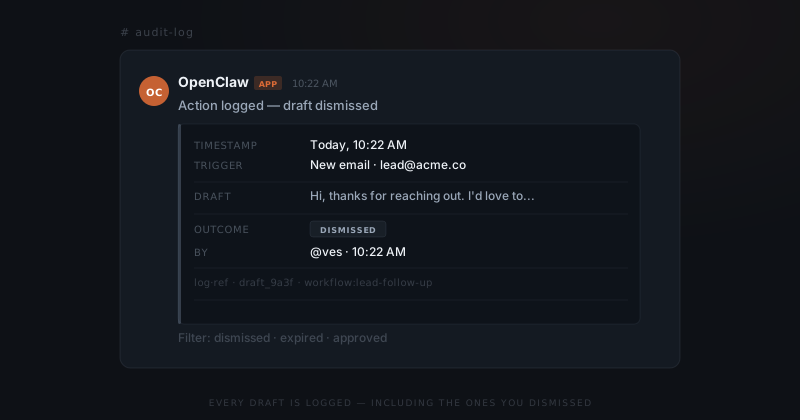
Each event the agent processes produces a log entry in the #audit-log Slack channel. The entry always contains five fields.
| Field | What it shows |
|---|---|
| Timestamp | When the draft was produced — not when you acted on it |
| Trigger | What fired the workflow ("new email · lead@domain.com") |
| Draft | A truncated preview of what the agent proposed to send |
| Outcome | Approved, Edited, Dismissed, or Expired |
| By | Who acted on it, and at what time |
For approved drafts, a sixth field appears: Sent — the exact timestamp the action executed.
Reading the log in Slack
The audit log posts to a dedicated Slack channel — #audit-log by default. You don't need to export anything to read it. Every entry arrives as a structured message as events happen.
Dismissed and expired drafts appear in the log exactly the same as approved actions. The log is a complete record — not just what went out, but everything that was considered and rejected.
To skim a specific period, use Slack's search: in:#audit-log after:2026-03-28. To find a specific workflow, search for the workflow name: in:#audit-log lead-follow-up. Entries are sorted newest-first by default.
The four entry types
Not all log entries mean the same thing. Reading them correctly tells you what actually happened.
| Outcome | What it means |
|---|---|
| Approved | You reviewed the draft and sent it as written |
| Edited | You rewrote the draft before approving — the final version is in the log |
| Dismissed | You cancelled this instance — nothing sent, trigger unaffected |
| Expired | The expiry window closed before you acted — nothing sent, logged as unactioned |
Dismissed and expired are operationally different. A dismissed draft means you saw it and chose not to send. An expired draft means you didn't get to it in time. Both are normal — but a high expiry rate for the same workflow suggests the expiry window is too short or the timing is wrong.
While you were in meetings, the agent was logging every move.
Exporting for clients or teams
The full log is exportable as a CSV from the ClawBuilt dashboard. Each row is one event, with all five fields plus the full draft content.
When to export:
- Client accountability — agencies that deliver work on behalf of clients can show which outbound emails were reviewed by a human before sending
- Team handoffs — when a team member joins or leaves, the log shows exactly what was sent and approved during their tenure
- Audits — regulated businesses can demonstrate that no AI action executed without sign-off
The export includes dismissed and expired entries. It is a complete record of agent activity — not a curated view of what succeeded.
Patterns worth watching
Routine log review takes two minutes. Three patterns signal that a workflow needs adjustment.
High dismiss rate on the same workflow. If you're dismissing four out of five drafts from the same trigger, the template or the trigger condition isn't right. The agent is producing drafts you don't want.
Repeated expiries on time-sensitive workflows. An expiry means you didn't act in time. If this happens regularly on a follow-up workflow, the expiry window is too short or the alert isn't landing where you'll see it.
Same trigger misfiring. If the trigger field shows the same condition producing drafts you're consistently dismissing, the rule needs tightening. Filter by that trigger to see the pattern clearly.
Bring these patterns to ClawBuilt. Each one has a configuration fix — tighter trigger, adjusted template, or a different Slack channel for the alert.