The three-part OpenClaw workflow scope test
Before picking a workflow, apply this test. A workflow is scopeable if you can answer all three questions in under ten seconds.
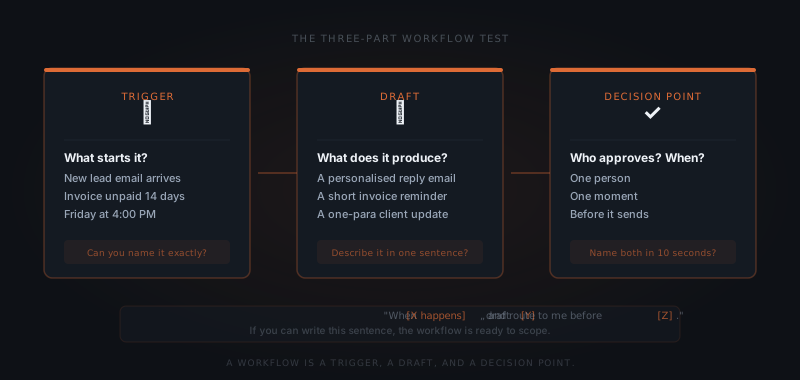
Trigger — What causes this workflow to start? A new email from a lead. An invoice that has been unpaid for 14 days. A Friday at 4pm. If the trigger is fuzzy ("when something needs following up"), the agent will either fire on the wrong things or not fire at all.
Draft — What does the output look like? A reply email with a specific structure. A Slack message summarising the week's client activity. A two-line invoice reminder. If you cannot describe the draft in one sentence, the template cannot be written yet.
Decision point — Who approves it, and when? One person, one moment. If the approval path is "depends on the situation," that dependency needs to be resolved before the workflow goes live.
A workflow is not a category like "email" or "follow-up." It is a trigger, a draft, and a decision point. If you cannot name all three in ten seconds, the workflow is not ready to scope yet — but it can be made ready in a single conversation.
If a workflow fails this test, it is not the wrong workflow. It is an underspecified one. The fix is usually a ten-minute conversation to tighten the trigger or the output format.
Why volume is the wrong criterion for OpenClaw's first workflow
The most time-consuming workflows are usually the least structured ones. Inbox management takes hours per week precisely because every email is different. Proposal drafting is slow because each proposal requires unique context. These workflows feel like obvious automation candidates — but they are hard to scope because neither the trigger nor the output is consistent.
Pick the workflow with the clearest yes/no moment, not the busiest one.
High-volume, low-structure workflows produce more edge cases than a first implementation can handle. The agent fires on the wrong emails. Templates do not fit the situation. You spend more time dismissing bad drafts than you would have spent doing the task yourself. That is not a technology failure — it is a scoping failure.
Start with a workflow that has a sharp trigger and a predictable output. Once that runs cleanly, the high-volume work becomes easier to scope because you understand how the agent behaves.
Three OpenClaw workflows that scope well first
Lead follow-up passes the test cleanly. Trigger: a new lead email arrives. Draft: a reply that acknowledges the inquiry, confirms next steps, and proposes a time. Decision point: you approve before it sends. The template is specific enough to build, the trigger is unambiguous, and the approval moment is obvious.
Invoice chasing is the most mechanical workflow on the list. Trigger: an invoice is unpaid after a configured number of days. Draft: a short, professional reminder that references the invoice number and due date. Decision point: you approve or dismiss. There are no edge cases that require judgment until the third or fourth chase — and by then, the pattern is clear enough to handle.
Weekly client updates work because the trigger is time-based, not event-based. Trigger: Friday at a configured time. Draft: a summary of the week's activity for each client, pulled from email threads and project notes. Decision point: you review and send. The format is consistent by definition, and the approval moment is the same every week.
How to write the OpenClaw workflow scope
When you come to the setup call, bring this sentence for your chosen workflow:
"When [X happens], draft [Y], and route it to me for approval before [Z]."
Examples:
- "When a new lead emails our main address, draft a personalised reply with a calendar link, and route it to me before it sends."
- "When an invoice is unpaid after 14 days, draft a short reminder with the invoice number and amount, and route it to me for approval."
- "Every Friday at 4pm, draft a one-paragraph update for each active client based on the week's emails, and route them to me before end of day."
If you can write this sentence for your chosen workflow, the scoping conversation takes fifteen minutes. If you cannot write it yet, that conversation is still worth having — it usually produces the sentence within the first ten minutes.
What OpenClaw workflows to defer to month two
Some workflows sound like good candidates but do not scope well in week one.
Meeting notes depend on variable input — every meeting is different, and the expected output varies by client and purpose. Scope this after the agent understands your clients and your formats.
Social media drafting has no clear trigger and no obvious approval cadence. It works once you have a content calendar that generates predictable requests.
Support triage involves judgment calls about urgency and routing that need to be defined before the agent can make them reliably. It gets easier to scope once you have documented how you handle the common cases.
None of these are ruled out. They are second-wave work — better suited to month two, once the first workflow has shown you how the agent handles your style and context.