What triggers the sequence
The onboarding sequence starts when a contract is signed. The trigger is configured during setup — typically a tag applied to a CRM deal, a Notion status change, or a manual signal you send in Slack. Once triggered, OpenClaw identifies the client type from the context and loads the corresponding sequence.
Different client types run different sequences. A new retainer client gets a different welcome, different information requests, and a different kickoff checklist than a one-off project client. The sequences are configured once and selected automatically from the trigger. You do not choose which one to run each time.
The sequence step by step
Welcome email drafted
OpenClaw drafts the welcome email with the client's name, company, and any project-specific details from the signed contract. It surfaces in Slack for approval before anything sends.
Onboarding form sent
After the welcome is approved and sent, the onboarding form goes out. The required fields for this client type are defined in your configuration.
Submission checked for completeness
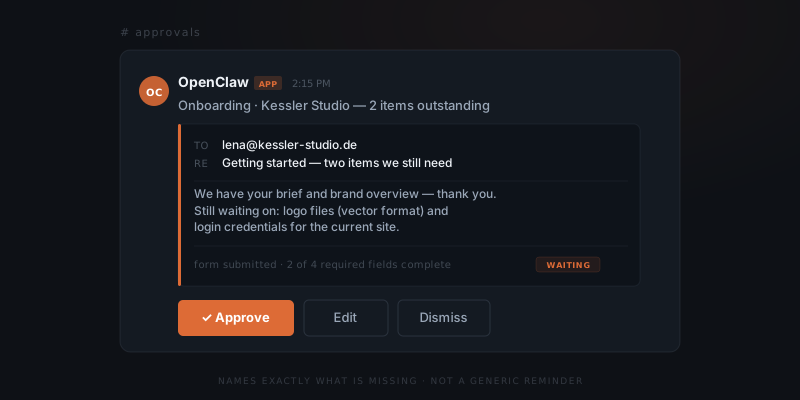
When the client submits the form, the agent checks it against the required fields. If anything is missing, it drafts a follow-up that names the specific missing items.
Assets and access chased if needed
If files, credentials, or tool access have not arrived by a configured deadline, a chase message is drafted and surfaced for approval.
Kickoff confirmed
Once all required inputs are in, the kickoff email goes out — with an agenda and a summary of what was received.
Onboarding record logged
A structured summary of the full sequence is written to your CRM or Notion project database.
How completeness is tracked
During setup, ClawBuilt defines what "complete" means for each client type: which form fields are required, which asset types are expected, which access credentials are needed before work begins. The agent checks each submission against that definition.
When the agent identifies missing information, the follow-up names what is missing specifically — "still waiting on your brand guidelines and the logo files in vector format" — not a prompt to re-submit the form. Clients act on specific requests faster than vague reminders, and specific requests do not make the client feel like they are being chased by a system.
If the client sends the missing information in a reply email rather than via the form — which happens — the agent reads the thread, matches the content to the outstanding fields, and updates the completeness check. The form submission is not the only recognised path to completion.
What the approval looks like
Every outbound message — the welcome, the form, the chase, the kickoff — surfaces in Slack as an approval card before it sends. The card shows the draft alongside the relevant context: what the client submitted, what is still missing, what was previously sent and when.
The message you keep putting off is usually two sentences.
You approve, edit, or dismiss. Dismissing skips this specific message without cancelling the rest of the sequence — useful if you have already handled something out of band. If you do not respond, the draft waits. It does not send on a timer.
What gets logged at the end
When the sequence closes, the agent writes a structured summary to your CRM or Notion database: client name and type, sequence start date, what was sent and when, what the client returned, what had to be chased, and any items still outstanding if the sequence ended before full completion.
The project record exists before the first deliverable is touched. Whoever starts the work has the full picture without reading back through an email thread.