How the reporting flow works
Data collected automatically
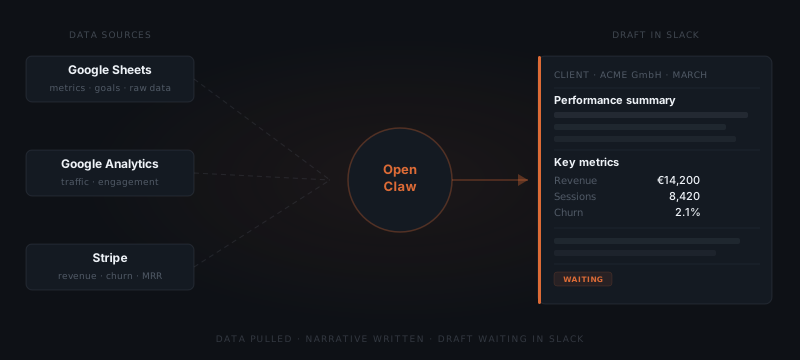
OpenClaw pulls from connected sources — Sheets, Analytics, Stripe, Notion — at the configured interval without anyone triggering it.
Draft built with narrative
Numbers need context. The agent writes it: what the numbers mean, what changed, what is worth noting.
Draft surfaces in Slack
You see the full report before anything leaves. Context for each movement is included.
You review and edit
Change the framing, add a note, adjust the numbers — whatever needs adjusting. The agent applies your edits.
Approved and delivered
Once you approve, the report goes to the client from your email with your signature, on the schedule you committed to.
Data from wherever it lives
OpenClaw connects to your data sources: Google Sheets, Google Analytics, Stripe for revenue and subscription data, Notion databases, and marketing platforms via available integrations. For each report, you configure which sources to pull and what metrics to include.
The data pull happens automatically at the configured time. By the morning a report is due, the draft is already in Slack waiting for your review — not a blank document waiting for you to open four dashboards.
Numbers that speak for themselves rarely do
Raw numbers without context require the reader to interpret them. A 12% drop in engagement could mean a slow month, a seasonality effect, or a genuine problem — and which one it is changes how the client should feel about it. OpenClaw writes the narrative layer that puts numbers in context.
When the draft is already built from the activity record, the review takes minutes instead of a morning. You are editing a document, not producing one.
The framing is based on the data itself — what changed week over week, what is tracking against a goal, what is an anomaly. You review that framing and approve it, or change it before it goes out.
The months where everything happened
The hardest reports to write are the busy ones.
A month where a lot happened is the most important to report on accurately, and it is also the month where sitting down to write feels most daunting.
OpenClaw drafts from the data regardless of how much there is. A high-activity month produces a richer draft; a quiet one produces a tighter one. The effort on your end is the same: review, adjust, approve.
Proof of work, not just results
For retainer-based engagements, clients are often paying for ongoing work that is not always visible in the output. A monthly report that includes what was done — not just what the metrics show — is what justifies the relationship between reporting periods.
OpenClaw can pull from Notion task logs, GitHub commit summaries, or an activity record you maintain — and include a work summary alongside the performance data. The client sees the output and the effort behind it. That context is what turns a number into a story.
Per-client format, consistent delivery
Each client gets a report in their preferred format. One wants a two-paragraph narrative and three numbers. Another wants a full breakdown by channel with screenshots. The format is configured once and applied every time. OpenClaw does not average the format across clients — each report is built to the spec for that relationship.
The delivery cadence — weekly, bi-weekly, monthly — is also per-client. Once configured, it runs without anyone having to remember to trigger it.