The second job that comes with every client
A designer finishing a project for one client has three other clients waiting. Two need a status update. One sent an invoice question four days ago and has not heard back. A new enquiry arrived this morning with a brief that needs a response before the week ends.
None of this is the work the designer was hired to do. All of it has to happen anyway.
Solo freelancers billing €5k–15k per month spend 5–8 hours each week on communication and admin that does not directly generate revenue. At a billing rate of €80 per hour, that is €400–640 per week spent on tasks that appear on no invoice.
What OpenClaw handles for freelancers
OpenClaw monitors the inbox and the project tracker. When a client has not received an update in five days, OpenClaw drafts the status message. When an invoice is overdue by more than three days, OpenClaw drafts the follow-up. When a new enquiry arrives, OpenClaw drafts a first response using the details from the message.
| Task | What OpenClaw does |
|---|---|
| Status updates | Drafts a progress update when a project hits a milestone or a scheduled update interval |
| Invoice follow-up | Drafts a payment reminder when an invoice passes the due date |
| New enquiry response | Drafts a first reply to incoming briefs using the request details |
| Stale thread follow-up | Drafts a follow-up when a thread has been waiting on the client beyond a defined window |
Every draft surfaces in Slack before anything sends.
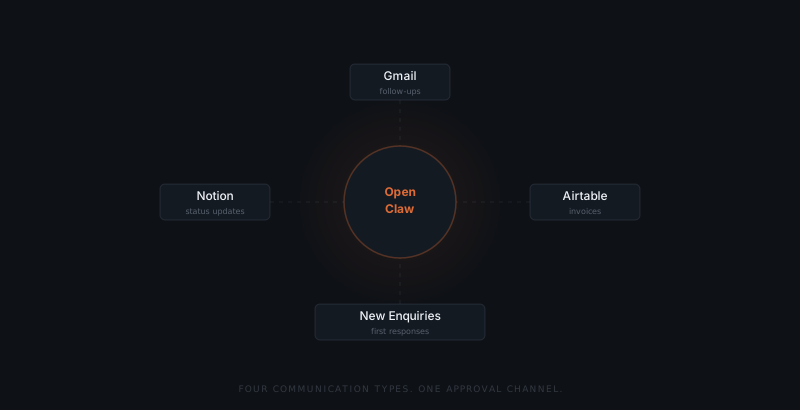
How approvals work for a solo operator
OpenClaw drafts every message — but nothing sends without the freelancer's approval. Each draft appears in the Slack approvals channel with the original context: the invoice due date, the project status, the incoming brief. The freelancer approves, edits, or dismisses. The approval constraint is enforced at the infrastructure level. There is no configuration that allows OpenClaw to send on its own.
The approval step matters more for a solo operator than for a team. On a team, a mistaken message can be caught by a colleague before a client sees it. For a freelancer, the message arrives in the client's inbox under their name with no review layer in between. The approval step is that review layer.
Most drafts need no changes. A draft that is accurate and well-timed takes five seconds to approve. The week's follow-ups clear in a single morning pass through Slack.
What a week looks like with OpenClaw running
The client work is the job. The follow-ups, invoices, and status updates are the second job nobody hired you for.
Monday: two enquiries arrived over the weekend. OpenClaw has drafted a first response to each. The freelancer approves both before starting client work.
Thursday: a project milestone cleared. OpenClaw has drafted the client update. An invoice from Tuesday is three days overdue. OpenClaw has drafted the payment follow-up. Both surface in Slack during the morning check.
Friday: a thread has been waiting on client feedback for six days. OpenClaw drafts a nudge. The freelancer approves it and closes the week.
Five approvals. Twelve minutes. The 5–8 hours of admin does not disappear entirely — but the part that required composition is handled.
What freelancers keep doing themselves
OpenClaw handles the drafting and the timing. Freelancers keep the judgment calls.
New enquiries need a rate and availability assessment before the response goes out. Project updates need the freelancer's read on whether a deliverable is on track. Payment conversations that escalate past the first reminder stay with the freelancer. Relationship decisions — which clients to take on, which to let go — never leave the freelancer's desk.
OpenClaw handles the communication that is correct, timely, and repetitive. The freelancer handles the communication that requires a judgment neither the client's brief nor the project tracker can provide.