Triage before you open the tab
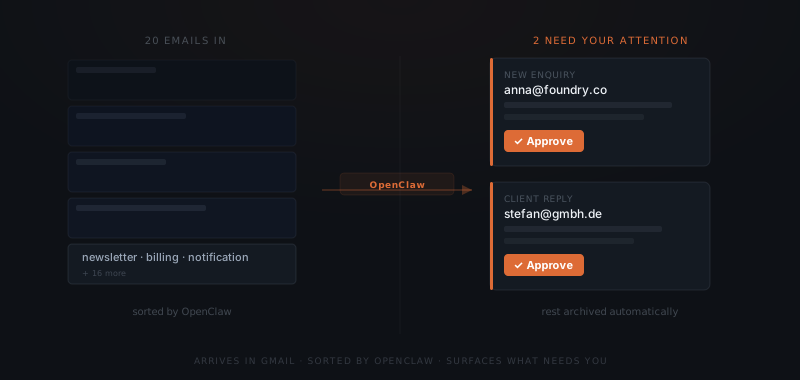
OpenClaw connects to Gmail and processes incoming messages continuously. Not on a batch schedule — as they arrive. When something comes in, it is classified immediately.
| Email type | What happens |
|---|---|
| Newsletters and automated notifications | Archived without surfacing |
| Support requests | Triaged by type, draft reply queued for approval |
| New client or prospect enquiries | Flagged with context, priority draft queued |
| Invoice and billing queries | Matched to records, draft response prepared |
| Internal team messages | Surfaced with context summary |
| Existing thread replies | Draft reply prepared using thread history |
The volume you actually interact with drops significantly without you setting up a single filter yourself. The triage logic is configured during setup to match how your inbox actually works — not a generic ruleset applied on top of it.
Drafts that wait in Slack
When a reply is needed, OpenClaw drafts it in your voice and surfaces it in Slack as an approval card. The card includes the original message, the proposed reply, and context about why it was triggered. You approve, edit, or dismiss.
The draft uses the full thread context. If this person emailed you six months ago and you responded a specific way, that history informs the tone and content of this draft. It is not a generic template — it is a response anchored to the specific conversation.
The part of your inbox that never changes
Every inbox has the same twenty per cent: the newsletters you never unsubscribed from, the automated SaaS notifications, the receipts, the calendar invites. OpenClaw categorises these and keeps them out of your decision queue permanently. You see the count in a morning summary if you want it. You do not have to touch them to stay on top of what matters.
For subscriptions and service notifications, the agent can take action: unsubscribe from a newsletter, archive a receipt to a folder, confirm a calendar invite. Each action is proposed and approved first.
One block of decisions instead of constant interruptions
The rest of the day is not punctuated by inbox anxiety.
With OpenClaw triaging continuously, you process approvals in one batch — morning and afternoon — rather than reacting to each email as it arrives. The agent holds drafts until you are ready. Nothing sends without your review. You get batched processing without enforcing it yourself.
What is still outstanding
At end of day, OpenClaw delivers a summary: what came in, what was replied, what is waiting, what was archived. You see the full picture in thirty seconds without opening the inbox.
If something urgent was not replied to — a prospect's question, a client's deliverable for review — it surfaces in the summary with a flag. Nothing urgent slips because the day got busy.
The difference between triaged and managed
Triage is classification. Management is what happens after: the draft that gets written, the follow-up that triggers if no reply comes, the archive logic that keeps the inbox clean. OpenClaw does both. It is not a smart filter that labels emails differently. It is an agent that takes next actions on them — draft, reply, follow up, archive, flag — with your approval at each step.
That is the difference between an inbox that is organised and an inbox that is actually handled.