The cost of delayed chasing
Service businesses lose more money to slow follow-up than to non-paying clients. Most invoices get paid eventually — but later than they should, because the chaser came late or not at all.
The reason is not forgetting. Chasing money from a client you have a relationship with feels uncomfortable. Sending a chaser a week after the due date feels like an accusation. So founders delay. They tell themselves the client will pay soon. Meanwhile, cash sits outside the business.
What OpenClaw monitors
OpenClaw connects to your invoicing tool — Xero, QuickBooks, or FreshBooks — and tracks the status of every open invoice. It watches the issued date, the due date, and whether payment has been received.
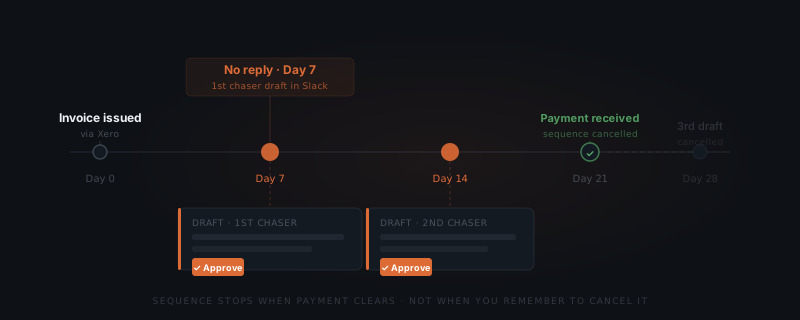
When an invoice crosses the first configured threshold — by default, seven days past due — OpenClaw drafts the first chaser. It does not send it. The draft surfaces in Slack for your approval.
The same logic fires at the second and third thresholds. Each draft reflects how overdue the invoice is and how many previous chasers have already gone out.
The chase sequence
A standard invoice follow-up sequence has three drafts:
| Draft | Trigger | Tone |
|---|---|---|
| First chaser | 7 days past due | Gentle reminder, assumes oversight |
| Second chaser | 14 days past due | Direct, references the previous message |
| Third chaser | 28 days past due | Firm, flags the outstanding amount clearly |
Each threshold is set during configuration and can be adjusted per client. A large anchor client might get more runway. A short-term project client might get a tighter window. The defaults work for most service businesses without adjustment.
Every invoice gets followed up — not when you remember, but at the configured interval.
When the sequence stops
OpenClaw monitors payment status directly. When your invoicing tool registers the payment, any remaining drafts in the sequence are cancelled automatically. You do not need to dismiss them. The system knows the invoice is closed.
This is what makes the sequence safe to run without active management. A payment that arrives after the first chaser does not trigger a second. The sequence tracks payment status, not just elapsed time.
A draft, not a template
Each chaser is written with the full invoice context: the client name, the invoice number, the amount outstanding, and how many previous chasers have already been sent. The first draft sounds like an oversight check. The third sounds like a firm escalation.
You still approve before anything sends. But instead of writing the email yourself — while feeling awkward about it — you review a draft pitched correctly for the situation. The friction of starting is gone. The easier path becomes following up, not avoiding it.