New leads detected across channels
Leads arrive from multiple places: contact form submissions, direct enquiries, referral introductions, inbound messages. OpenClaw connects to Gmail and watches for patterns that indicate a new enquiry — specific subject lines, forms with a consistent format, senders new to your inbox writing with buying intent.
When a lead is detected, it is classified and surfaced immediately.
| Lead type | Source | Routes to |
|---|---|---|
| New enquiry | Contact form, direct email | First response sequence |
| Referral introduction | Email intro from existing contact | Personalised first response |
| Re-engagement | Previous contact, new message | Context-aware reply |
| Expansion opportunity | Existing client, new ask | Account expansion workflow |
The first reply drafted in minutes
A draft is generated as soon as the lead is detected. OpenClaw reads the enquiry, pulls relevant context — prior emails, company name, what they asked — and drafts a response that moves the conversation forward.
The lead receives a reply that sounds like you — because it is reviewed and approved by you — within minutes of enquiring rather than hours or days later.
The draft surfaces in Slack with the original message alongside the proposed reply. You read both, approve or adjust, and the response goes out from your address with your signature.
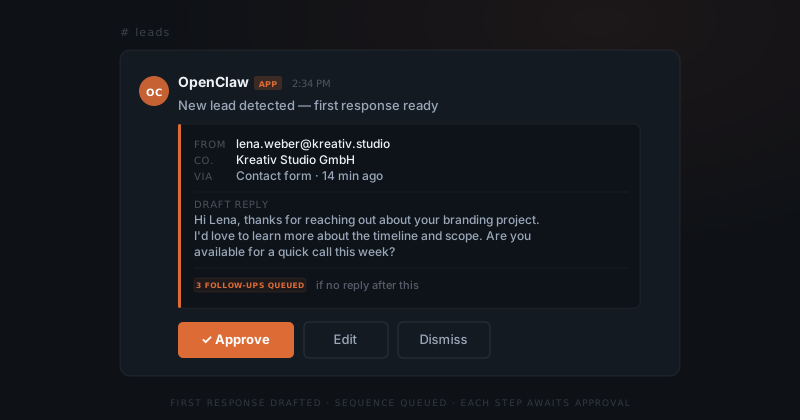
A nurture sequence that does not feel automated
If the lead has not replied or booked a call, they enter a follow-up sequence. The sequence is not a drip campaign with identical emails on a fixed schedule. Each follow-up is drafted at the point it triggers, using the current state of the thread: what was sent, what was replied, where it left off.
The result is a follow-up that reads like a natural continuation rather than a templated message. You approve each one before it goes out. If the lead replies, active drafts are cancelled and the conversation continues normally.
Context carried through the whole sequence
A follow-up that ignores what the lead said in their first email, or asks a question they already answered, signals that no one is actually paying attention. OpenClaw carries the full thread context through every draft in the sequence. The follow-ups reference the conversation history, not a generic script.
If a lead mentioned a specific timeline, concern, or use case in their initial enquiry, those details appear in the follow-up drafts. You are not personalising each email by hand — the agent is. But you review each draft, so anything off gets caught before it sends.
Handoff to calendar and CRM
When a lead expresses interest in a call or meeting, OpenClaw drafts a reply with your availability or a booking link. Once the meeting is confirmed, the lead's details — email, company, conversation summary, stated interest — are logged to your CRM if you have one connected.
For founders not using a CRM, OpenClaw maintains a simple record of active leads: name, company, current stage in the sequence, last contact date, and notes from the thread. A clear view of active leads without tracking anything yourself.
Leads that close and leads that go cold
Not every lead converts. Some go quiet despite multiple follow-ups. Configure a maximum number of follow-up attempts and a final close-out message — a brief note that acknowledges the gap and leaves the door open. The sequence ends cleanly. The lead is moved to a closed state.
The process runs without your oversight. New leads get a fast first response. Unresponsive leads are followed up until they reply or close. Converts are handed off to booking and CRM. You handle the approvals — every draft, every step.