How the workflow runs
Call ends, draft triggered
You signal in Slack that the discovery call is done — or a calendar event closes. OpenClaw starts reading the thread.
Thread and rate card read
The agent reads the email exchange, any pre-call notes, and your configured rate card to assemble the scope and investment sections.
Draft surfaces in Slack
The full proposal draft appears as an approval card with the original context alongside it.
You review and edit
Read the draft against the thread. Correct anything. The agent re-drafts any section you change.
Approved proposal sent from your email
The document goes out from your address, in your chosen format, with your signature.
What OpenClaw reads to build the draft
The draft is assembled from two sources.
The first is the sales thread: the initial enquiry, the pre-call email exchange, and any notes you have logged in Slack or Notion before or after the call. The agent reads the prospect's stated problem, timeline, goals, and constraints — in their language, not a generic scope description.
The second is your rate card and service modules: your standard deliverables, typical timelines, and prices, configured by ClawBuilt during setup. You share these on the setup call. The agent uses them to populate the scope and investment sections accurately.
If the prospect's scope does not map cleanly to your standard modules, the agent flags the gap rather than filling it with invented numbers. The approval card shows a note: "Non-standard scope — confirm pricing before approving." Nothing goes out with wrong numbers.
What the draft looks like in Slack
The approval card shows the complete proposal — problem statement, proposed scope, deliverables, timeline, and investment — alongside the thread excerpts it was drawn from. Each section is traceable to its source.
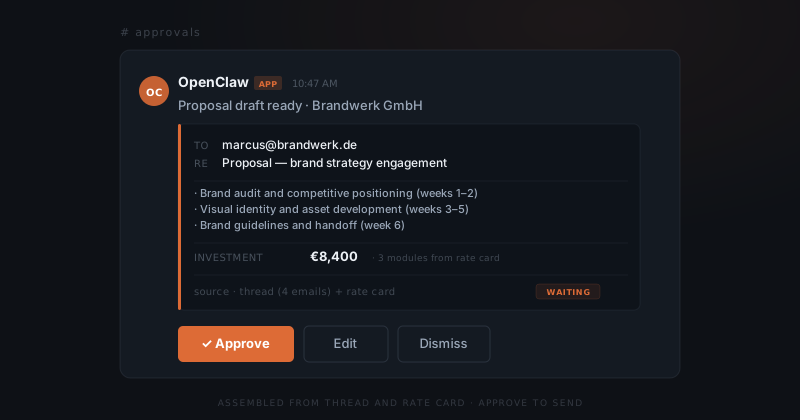
You do not write the proposal. You edit one.
Editing happens in the Slack thread. Reply with your changes — adjust the scope, correct a price, add a section — and the agent updates the draft and re-surfaces it. Once it is right, you approve. The proposal does not send before that.
How the proposal reaches the prospect
Once approved, the proposal goes from your Gmail address with your signature. The output format is configured during setup: an email with the proposal in the body, a linked Google Doc, or a PDF attachment — whichever matches how you send proposals now.
The prospect receives it from you. There is no "sent via" footer. It reads like you wrote it, because you reviewed and approved every line.
Non-standard engagements and iterations
For engagements outside your standard modules — unusual scope, a mix of services, a phased approach — the agent drafts what it can and flags the sections it cannot populate with confidence. You fill in or adjust those sections before approving.
As non-standard variations become recurring, you can add them to your service module library on an iteration call. Over time, the proportion of proposals that need manual section work decreases.