Why renewals slip during delivery
A six-month retainer ends in three weeks. The client is happy with the work. A renewal conversation would take twenty minutes. But in the week before the renewal window opens, delivery is at full capacity — the work that justifies the contract takes priority over the conversation that extends it.
The renewal conversation does not happen. The contract lapses. The client moves on, not because the relationship had run its course, but because no one started the conversation in time.
Renewals are not lost in the renewal meeting. Renewals are lost in the weeks before the meeting, while everyone involved is focused on delivery.
How OpenClaw tracks renewal dates
OpenClaw reads renewal dates from wherever you store them — a Notion database, a CRM, a spreadsheet shared during onboarding. You tell OpenClaw where the dates live during setup; OpenClaw monitors the dates from that point forward.
OpenClaw fires renewal reminders based on actual contract end dates — not a generic drip sequence running on a fixed schedule. A contract renewed for another six months resets the sequence automatically. A contract paused mid-term adjusts the dates accordingly.
The trigger logic is date-based. OpenClaw calculates the outreach windows from each contract's end date and schedules the drafts in advance — no manual input required when a new contract is added.
What gets drafted and when
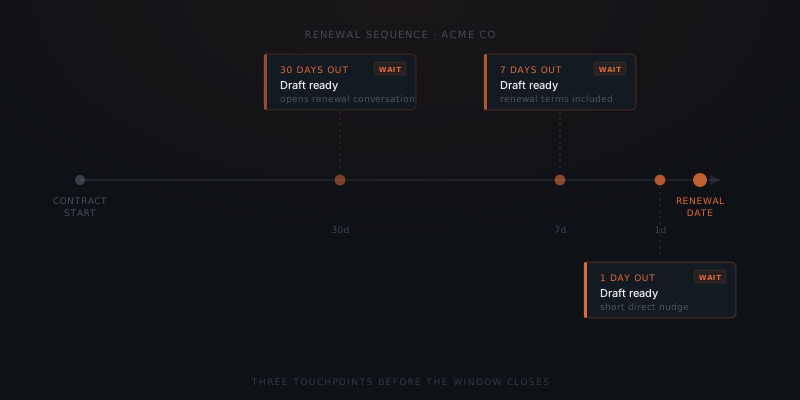
OpenClaw drafts three outreach messages for each renewal: one at thirty days out, one at seven days, and one on the day before expiry.
The thirty-day message opens the conversation early — before the client starts evaluating alternatives. OpenClaw frames the message around the work delivered and what the next period could cover.
The seven-day message is a direct prompt: the renewal is approaching, and here is what continuing looks like. OpenClaw includes the renewal terms from the contract where available.
The day-before message is a short, specific nudge. If an earlier message produced a reply, OpenClaw cancels the remaining drafts for that contract automatically.
A renewal reminder that didn't go out isn't a reminder. It's a churn event.
The approval step
Each draft appears in your Slack approvals channel at the scheduled time. OpenClaw shows the full message, the client name, the contract end date, and which stage of the sequence this draft represents.
You approve, edit, or dismiss. Editing the thirty-day message does not change the seven-day template — each stage is approved independently. Dismissing a stage logs the draft as deferred; OpenClaw sends the next stage on schedule unless you cancel the sequence for that contract.
Scaling across a full client base
OpenClaw runs renewal sequences for every active contract in parallel. Thirty clients, thirty sequences, each running on its own schedule.
You do not set up a sequence per client. You configure the templates and windows once; OpenClaw applies the configuration to every contract that enters the system. A new client added during onboarding gets a renewal sequence starting from the contract end date — no extra setup required.
Founders managing twenty or more renewals recover four to six hours per quarter previously spent tracking dates and composing outreach. The saving scales directly with the size of the client base.