Support triage before it becomes a backlog
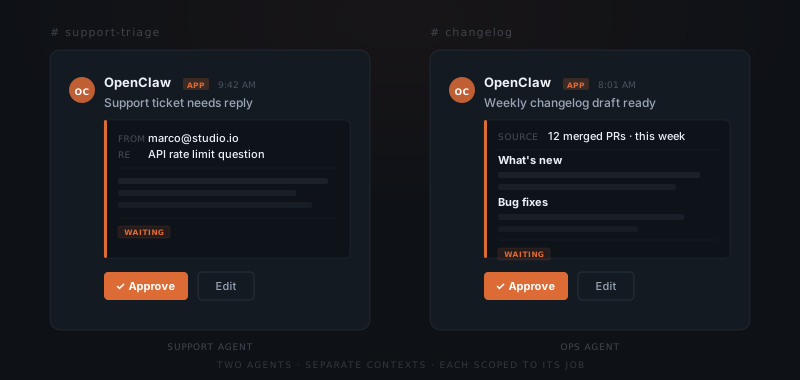
OpenClaw monitors your support inbox in real time via Gmail. When a support email comes in, the agent reads it, classifies the issue, and drafts a reply — in your voice, with context from prior conversations with that user. The draft surfaces in Slack for your review. You approve or edit, it sends.
For Slack-based support: the agent watches your channel, handles what it can, and flags the rest.
Nothing goes to the user without your sign-off. The effect is that your response time drops and your inbox stops being the place where requests go to pile up.
Feature requests that actually get logged
Feature requests arrive everywhere: support emails, Slack messages, user calls, sales conversations. Most never get written down in a useful place. OpenClaw extracts the request and creates a GitHub Issues entry or a Notion database record — whichever you use.
Tell it what happened in a call, or forward an email, or paste a Slack thread. It pulls out the request, formats it, and logs it. Over time you have a structured record — not a vague sense that several people mentioned the same thing.
Changelogs written from what you shipped
Changelogs are easy to skip when things are moving fast. OpenClaw reads recently merged pull requests on a nightly or weekly schedule via GitHub. It synthesizes what changed, groups it into user-facing categories, and drafts a changelog entry that you review before it goes anywhere.
The draft can go to a Notion page, a Slack channel, or an email to your users — wherever your update cadence lives. The writing time is close to zero. The judgment about what matters and how to frame it stays with you.
What customers are actually asking for
Synthesizing product feedback is one of those tasks that matters a lot and gets done rarely. OpenClaw runs it on a schedule. Every week or month, it reads your Notion feedback database, open GitHub issues, and recent support threads. It produces a synthesized summary: repeating themes, friction points, what has gone quiet.
You are making product decisions with a current picture of what users are saying rather than relying on whatever you happened to remember.
It surfaces in Slack or email. You make the product decisions.
Staying in touch with users without the draft overhead
Proactive communication — onboarding check-ins, update announcements, re-engagement emails — is easy to deprioritize when you are heads-down building. OpenClaw drafts those emails and surfaces them for review on whatever cadence makes sense. You approve and they send, or you edit first. Either way you are not starting from a blank page.
For event-driven communication: your product sends a webhook when something happens — onboarding complete, usage milestone, two weeks quiet. The agent drafts the appropriate message and waits for your approval before it goes out.
Two agents instead of one context window
Support and internal operations are different enough that mixing them creates noise. OpenClaw lets you run separate agents on the same installation, each scoped to its job.
| Agent | Watches | Can do |
|---|---|---|
| Support agent | Gmail inbox, Slack support channel | Draft replies, log conversations, surface priority flags |
| Ops agent | GitHub, Notion, email digests | Create issues, draft changelogs, synthesize feedback |
Each has its own context and tool permissions. Neither bleeds into the other. As you add workflows, they go to the right agent — not into one large context that handles everything poorly.