The sorting problem that precedes every reply
A support request arrives on a Monday morning. Before writing a reply, someone has to make three decisions: what kind of request is this, how urgent is it, and who handles it? In a business with a dedicated support function, that sorting is built into the process. In a five-person team where support lands in a shared inbox, the founder makes those decisions.
The hidden cost is not the time spent sorting. The cost is that sorting competes directly with responding. The hour it takes to work through the inbox — reading each request, assigning priority, deciding ownership — is an hour that produces no replies. By the time triage is complete, the most urgent messages have already been waiting.
Founders handling support for 30 to 80 customers spend 30 to 45 minutes per day on triage alone before writing a single response.
How OpenClaw reads and classifies incoming requests
OpenClaw monitors the support inbox and processes each incoming message before the founder opens it. OpenClaw reads the full message and assigns two things: a category and an urgency level.
Categories are defined during setup to match how the business works. A typical configuration covers four types: billing and payment questions, technical issues and bugs, feature requests and product feedback, and general enquiries. Each category maps to a response template and a routing path.
Urgency is separate from category. A billing question from a client with an overdue payment is more urgent than a billing question about a future invoice. OpenClaw reads the message content, the client's history, and account signals to assign a priority level. Urgent requests surface at the top of the approvals queue immediately. Standard requests queue behind them.
The draft first response for each classified request
For each classified message, OpenClaw drafts a first reply. OpenClaw draws from the template for that category and adapts the language to the specific request — the client's name, the subject of the query, and the tone of the conversation history.
A client who has submitted three previous tickets on the same billing issue receives a different draft than a client raising billing for the first time. OpenClaw uses the prior conversation to calibrate both the content and the approach of the response.
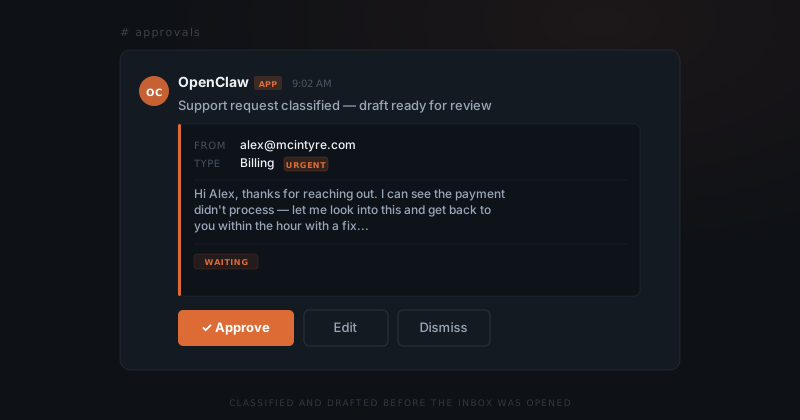
Every draft surfaces in the Slack approvals channel. The approval card shows the original message, the assigned category and urgency, and the drafted response. The founder approves, edits and approves, or dismisses. Dismissing logs the request as deferred with a timestamp — nothing disappears quietly.
The approval step that controls every action
OpenClaw does not route requests to team members or send responses to clients automatically. Every draft and every routing suggestion appears in the Slack approvals channel for the founder to act on. Nothing moves until the founder approves — that constraint is enforced at the infrastructure level, not a preference setting.
The approval step matters when a classification is wrong. A request OpenClaw reads as a feature report might be a bug the founder recognises from an earlier conversation. The founder dismisses the suggested category, overrides it, edits the draft, and approves. OpenClaw logs the correction alongside the original classification — future requests that match the pattern will be classified differently.
The approval step is also where priority disagreements get resolved. An urgent flag on a message that is not actually pressing can be dismissed without consequence. The request stays in the queue at standard priority.
What a week of triaged support looks like
By the end of a week, every request that arrived has a visible status. Approved requests have a sent response and a timestamp. Deferred requests are in the queue with a note. Routing suggestions show where the request went and when.
By the time the inbox opens, every request is already sorted.
The visibility matters more than any individual response. A founder running support without a system has a rough sense of what came in and what was answered. A founder with OpenClaw running knows exactly what came in, how each message was classified, when it was handled, and what was said.
Volume patterns become actionable in the log. If four clients raise billing questions in the same week, that pattern appears across the triage history. The signal is invisible inside any single support thread. OpenClaw surfaces it across all of them.