The solo configuration
When you are the only decision-maker, every draft routes to you. Inbox drafts, CRM updates, client reports — all of them surface in your Slack channel. You review each one, approve what is ready, edit what needs adjusting, and dismiss what is no longer relevant.
This is the standard setup for most founders at launch. It is also the right one: you learn what the agent does by seeing every draft before anything goes out. You build trust in the output before delegating the review.
Extending to a team
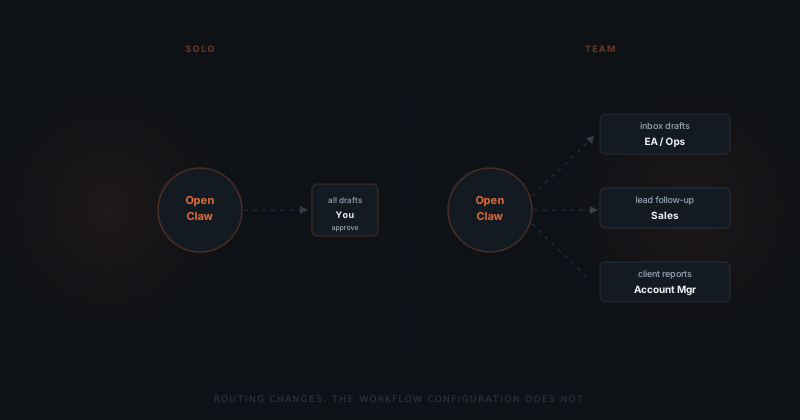
When a function moves to someone else, one field changes: the approval owner for that workflow.
An inbox management workflow that routed to you can route to your executive assistant. A lead follow-up workflow can route to whoever now owns sales. The agent configuration — the trigger logic, the draft template, the integration — stays identical. The only change is who gets the Slack card.
How approval routing works
Each workflow has one approval owner. When a draft is ready, it routes to that person — not to everyone with access. You will not see lead follow-up drafts if you have assigned that workflow to sales.
Routing is per-workflow, not per-account. You can assign a workflow to two people for coverage — a primary and a backup — but drafts go to the primary unless they do not respond within a configured window.
This keeps the approval experience clean. Each person only sees drafts for the functions they own. Nothing is shared by default, and nothing broadcasts to the team.
Headcount doesn't change the configuration. Workflow scope does.
What stays the same
The underlying logic — what triggers the agent, how it constructs a draft, what actions it can take — does not change when you add people to a workflow.
What you configured on day one is what your team runs. There is no separate team version of OpenClaw with different capabilities. Adding an approval owner does not change the trigger, the draft structure, or the integration. It updates one field.
This means you can hire into a workflow without rebuilding it. The new person inherits the configuration you have already tuned. They will see drafts immediately and can request changes to the template as they get familiar with the output.