Friday reporting steals the afternoon it is supposed to describe
Friday at 3pm. The week is done. Before the reports can go out, someone has to reconstruct what happened in it. That means opening Notion to check the task updates. Reading the email thread with each client. Pulling the last status from Airtable. Reviewing what shipped on GitHub.
None of these steps is difficult. Each source takes two or three minutes. Across six clients, that is 90 minutes of retrieval before a single sentence is written.
The pattern scales badly. Four clients is manageable. Eight is a Friday afternoon. Twelve means the reports go out on Monday.
What OpenClaw pulls from to build each report
OpenClaw connects to the tools where the work already lives: Notion, Airtable, GitHub, and email. For each client, OpenClaw tracks what changed in the current reporting period. OpenClaw logs tasks completed, milestones hit, threads closed, and issues resolved.
OpenClaw does not summarise everything in the workspace. OpenClaw reads the project structure defined during setup. OpenClaw extracts the fields that belong in a status report: work completed, current blockers, next steps. The extraction runs against the live state of each workspace — not a snapshot from earlier in the week.
This is the part that takes 90 minutes on a Friday. OpenClaw completes it before the founder opens the inbox.
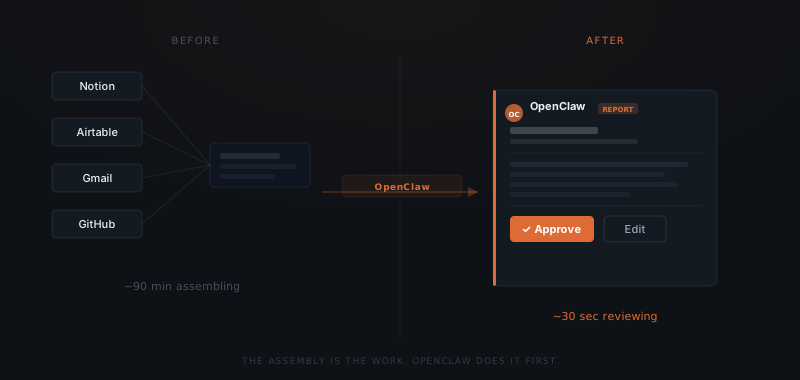
How the draft report is assembled
The report was never the hard part. Assembling the data to write it was.
For each client, OpenClaw generates a structured draft from the extracted data. The draft follows the template defined during setup. That covers: work completed this week, current status, blockers, and planned work for next week.
The draft uses the client's name and references the specific tasks and deliverables from the project tracker. OpenClaw does not produce a list of database entries. The output is a readable paragraph written from the extracted facts.
The approval card in Slack shows the extracted data alongside the draft. The founder can see exactly what OpenClaw pulled and verify the draft reflects it accurately before approving.
The approval step before the report sends
OpenClaw assembles the draft from live project data — but the draft does not send automatically. Every report surfaces in the Slack approvals channel before it reaches the client. The founder approves, edits, or dismisses. Nothing sends without that sign-off. That constraint is enforced at the infrastructure level.
The approval step is where errors get caught. A task OpenClaw logged as complete might have been reversed on Thursday. A blocker the founder resolved in a call will not appear in the project tracker yet. The draft is the starting point — not the final version.
Most weeks, the draft needs a sentence adjusted or a detail added. Approving an accurate report takes 30 seconds per client. Six clients is three minutes.
The reporting history OpenClaw builds across weeks
Every report OpenClaw generates is logged. OpenClaw records the client, the reporting period, what was included, when it was approved, and when it sent. After eight weeks, that log is a complete project history for every active engagement. Timestamped, consistent, built without any additional effort.
Agency and consultancy founders rarely have this kind of reporting history in a usable form. Notes are in email threads. Status updates are in Slack. The project tracker shows the current state but not the progression.
The reporting log changes what is visible. Patterns that are invisible inside a single Friday become clear across eight of them. A client whose status consistently shows blocked items. A project where progress has slowed for three consecutive weeks. A deliverable that regularly carries forward to the following week. The founder who sees that pattern can act on it before it becomes a conversation.