Types of mistakes
OpenClaw drafts based on what it sees. The incoming email, the CRM record, the Slack message that fired the trigger. Three types of mistakes show up in practice.
Tone mismatch. The agent reads a frustrated client message and drafts a reply that's too formal or too brief. The information is accurate. The register is wrong.
Trigger misfire. A rule fires when it shouldn't. A new email from an internal domain gets treated as an inbound lead. The trigger condition was too broad.
Stale context. The agent drafts a status update referencing a project that closed last week. The data source the workflow reads from wasn't updated.
These are the same errors a new hire makes in their first two weeks. The difference is what happens next.
Why the approval gate is the error ceiling
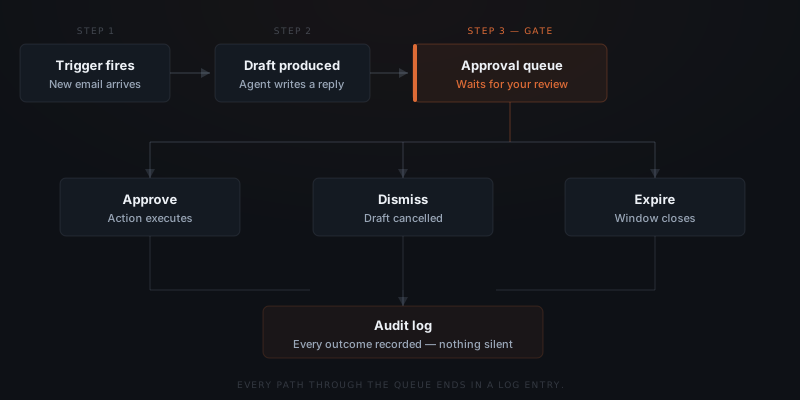
Every draft OpenClaw produces waits for your sign-off before it goes anywhere. That is not a preference — it is how the system is built.
A mistake is always a draft problem. Never a delivery problem.
The agent cannot retry, escalate, or find another path to send. If you dismiss a draft or let it expire, that action is finished. There is no fallback that goes out without you.
The approval gate changes what a mistake means. Not "something wrong went out" — "I saw a bad draft and dismissed it." Those are different events. A dismissed draft costs nothing.
What happens to a wrong draft
When a draft in Slack is wrong, three paths are available.
Dismiss cancels this instance. Nothing sends. The agent logs the dismissal and moves on. If the same trigger fires again, a new draft appears.
Edit opens a thread where you rewrite the content before approving. Use this when the structure is right but the specifics need adjustment.
Let it expire. If you configured an expiry window and don't act within it, the draft closes automatically. The agent logs it as unactioned.
All three produce a log entry. Nothing is silently discarded.
Reading the mistake in the audit log
Every draft — approved, dismissed, or expired — appears in the audit log. A dismissed draft entry shows:
- Timestamp — when the draft was produced
- Trigger — what fired it ("new email from lead@domain.com")
- Draft content — exactly what the agent proposed to send
- Outcome — Dismissed, by whom, at what time
The worst OpenClaw can do is draft something wrong. That draft never sends itself.
Filter for dismissed and expired entries. That view shows exactly where the agent is missing the mark — and what to bring to the next configuration adjustment.
Fixing the pattern
A single wrong draft is noise. The same mistake appearing three times in a week is a signal.
Three causes account for most repeating mistakes, each with a different fix.
The trigger is too broad. The agent fires on conditions that don't warrant a draft. Tighten the trigger — add a condition, narrow the sender list, or exclude a domain.
The template is wrong. The draft structure doesn't fit what it's responding to. Rewrite the template with a concrete example of what a good output looks like.
The context is stale. The agent is drafting from outdated information — a project status, a rate, a contact field that changed. Update the data source the workflow reads from.
ClawBuilt handles these adjustments as part of the ongoing support. You flag the pattern in Slack; we fix the configuration.