Infrastructure, not a product
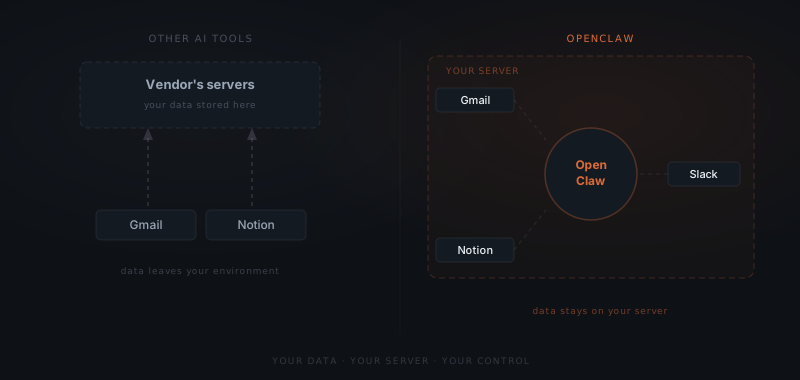
You install it, configure it, connect your tools, and it runs from there. The data never leaves your environment.
That distinction matters. With most AI tools, you are renting access to someone else's system. You trust them to keep it running, private, and priced the same next year. With OpenClaw, the system is yours.
| Other AI tools | OpenClaw |
|---|---|
| Hosted by the vendor | Self-hosted on your own server |
| You rent access | You own the system |
| Data sits in a vendor database | Data stays on your hardware |
| One interface, one context | Multiple scoped agents per workflow |
Your credentials, your message history, your workflow configurations — none of it sits in a vendor's database.
What it can actually do
The capabilities are broader than most expect. An OpenClaw agent can:
- Draft and send emails in your voice, for your approval
- Update CRM records from a conversation or meeting notes
- Pull together client reports from connected data sources
- Follow up on unanswered messages at a configured interval
- Summarize what happened in a meeting
- Flag things that need attention before you have noticed them
Scheduling is built in. Set the agent to run jobs on a fixed interval — daily briefings, weekly summaries, timed follow-ups — without anyone triggering them. The agent treats scheduled work the same as conversational work: it drafts, proposes, and waits for approval before anything goes out.
It lives where you already work
OpenClaw connects to 23 messaging platforms: Slack, WhatsApp, Telegram, Discord, iMessage, Google Chat, Microsoft Teams, and more. You configure which channels to connect. The agent is accessible from them — no new tool to learn, no new habit to form.
For most teams this means picking one channel — the one where work actually happens — and running the agent there. If that changes, you add a new channel.
OpenClaw is not a product you subscribe to. It is infrastructure you own — and data that never leaves your server.
Nothing goes out without your say-so
This matters most for client-facing work. OpenClaw's approval model is built into the framework itself. Before any external action — an email, a message, a file — the agent proposes it and waits. You approve or decline. It executes only after.
This is not a prompt instruction the model is trying to follow. It is a constraint enforced at the infrastructure level. The action is blocked until a human releases it. For client-facing work, that difference is significant — one wrong email can cause real damage, and the approval layer removes that risk without removing the value.
Your data stays on your server
Because OpenClaw is self-hosted, everything that runs through it — message history, credentials, tool access, session data — stays on your hardware. The AI models themselves can still be cloud-based. OpenClaw supports 40+ providers, including Anthropic, OpenAI, Google, and others. You choose which model to use, and you can switch.
The gateway, the connected tools, and the business data they touch never leave your server. For teams handling client information or working under confidentiality requirements, that is not a nice-to-have. It is the baseline.
More than one agent, each doing a specific job
OpenClaw can run multiple agents on the same installation, each with its own configuration, tool access, and context. A client-facing agent handles inbound messages. A separate one runs internal reporting. Another monitors a specific inbox. Each is isolated — they do not share memory or session history.
Give each agent exactly the permissions it needs and nothing more. Scoped tool access is not a safety checkbox. It is what keeps the system predictable across multiple workflows.