What OpenClaw assumes about your workflows
OpenClaw is built to run workflows that already exist — not to invent them.
When we configure a lead follow-up workflow, we need to know what a good lead reply looks like for your business. Not a perfect template, but a clear picture: the tone, the timing, the information included. When we configure a client reporting workflow, we need to know what your clients expect to receive and how often.
This does not require documentation or formal process design. Most founders who are ready carry this knowledge in their heads. They can answer "what does a good follow-up email from you look like?" without hesitation. That is the signal.
If the answer is "it depends on the situation" — and the situations are still being figured out — the agent cannot reliably produce the right output. It will produce output. But it will not consistently match what you actually want, because what you actually want is still being defined.
Three signs it is not the right time for OpenClaw
You are still figuring out your sales process. If how you respond to leads changes depending on where they came from, what they said, and what you felt like that morning — that is not a workflow yet. It is a set of instincts that have not been made explicit. OpenClaw can run explicit instincts. It cannot run unexplained ones.
Your communications are mostly one-offs. If the emails that take the most time are highly bespoke — custom proposals, complex negotiations, relationship-sensitive exchanges — the agent will struggle with them because the output cannot be templated. OpenClaw works best where the output is recognisably consistent: "every invoice reminder sounds like this," not "every email is completely different."
You want the agent to tell you what to do. OpenClaw is not a strategy tool. It does not suggest which leads to prioritise, which clients need more attention, or which workflows to build first. It runs the workflows you give it, in the way you configure them. If you are looking for the AI to make operational decisions on your behalf, that is a different product.
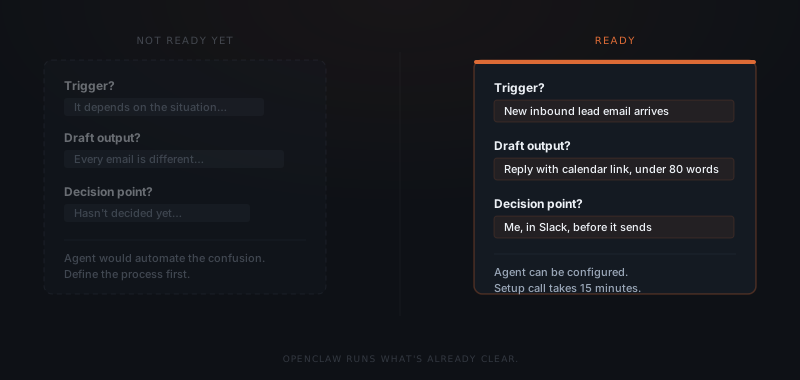
If you hand OpenClaw an undefined workflow, it will automate the confusion. The agent cannot resolve ambiguity that you have not resolved. Define the output you want first — then the automation is straightforward.
The founder OpenClaw works best for
There is a specific version of this founder. They have been running their business for at least a year. They know which emails they send every week that follow the same structure. They have a consistent way of following up with leads, even if they have never written it down. They know what a good client update looks like.
They are not overwhelmed by ambiguity — they are overwhelmed by volume. The problem is not that they do not know what to do. The problem is that doing it takes more time than they have.
OpenClaw doesn't build your process. It runs the one you already have.
When this founder arrives at a setup call, they can answer every scoping question within minutes. The workflows are clear. The approval moments are obvious. The templates write themselves from the examples they give us.
That conversation produces a live agent within a week.
What to do before booking an OpenClaw setup call
If you recognised yourself in the "three signs" section, the setup call is worth having — just not as your first move.
Before booking, apply the three-part test to one workflow you want to automate. Name the trigger. Describe the output in one sentence. Identify who approves it and when. If you can do that for one workflow, you are ready to scope it.
If you cannot — spend twenty minutes writing down how you currently handle that workflow. Not how you want to handle it. How you actually handle it today, in the cases where you do it well. That description becomes the template. That template becomes the agent.
The founders who get results fastest are not the ones with the most sophisticated processes. They are the ones who know their processes well enough to describe them.