The four components
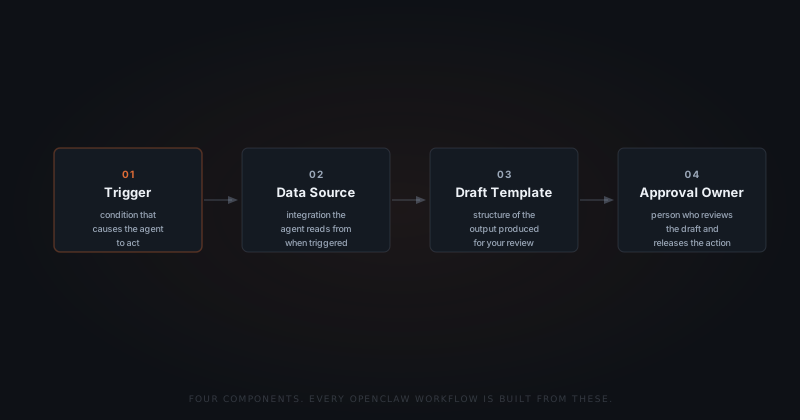
Every OpenClaw workflow is built from four things. Get these right and the rest follows.
Trigger
The condition that causes the agent to act — a new email matching a pattern, a Shopify order reaching a status, a Notion record left unchanged for three days.
Data source
The integration the agent reads from when the trigger fires — Gmail, Shopify, Notion, or wherever the relevant data lives.
Draft template
The structure of the output the agent produces for your review. For an email workflow, this is the format, tone, and details that belong in every draft.
Approval owner
The person who receives the draft in Slack and decides whether it sends. On a solo setup, that is you. On a team, it is whoever owns that function.
Most first workflows fit on a single page when written out. The setup call works through each component in order.
Defining the trigger
Triggers are written in plain language, not code. "A new email from a domain I don't recognise, with no prior thread" is a valid trigger description. We translate that into detection logic during setup.
The trigger is where most founders spend the most time — not because it is complex, but because precision here prevents the agent from firing on the wrong thing.
Good trigger definitions are specific about what qualifies and what does not. "A new email from a client" is a starting point. "A new email from an active client domain, in a thread with no reply in the last five days" is a trigger.
The more concrete the description, the tighter the detection. Vague triggers produce drafts for things you did not intend to automate.
Building the draft template
The draft template tells the agent what a good output looks like. For email workflows, this means: what goes in the opening line, what context to pull from the thread, what the closing ask should be, and what tone to use.
The fastest way to build this is to share three to five examples of emails you have already sent — not as a database, but as reference material. The agent learns the pattern and produces drafts in that structure.
You're not building logic. You're describing how you already work.
Templates are not fixed. Every time you edit a draft before approving it, the change informs the next output. Over the first two weeks, the drafts tighten to match your actual edits.
The first live run
The first time a workflow runs, treat it as a calibration. The draft will be in the right structure and cover the right information. The phrasing will need a few adjustments.
Approve what is ready. Edit what is close. Dismiss anything that fired on the wrong trigger — and flag the pattern so the detection can be tightened. Most workflows find their rhythm within the first ten drafts.
Most first workflows go live within 48 hours of the setup call. The time is spent agreeing on the trigger conditions and reviewing the initial drafts — not on configuration.