Where contracts go quiet
A contract goes out on a Tuesday. No reply by Friday. The founder means to follow up next week, but the week fills up. Two weeks later the prospect has signed with someone else — not because the price was wrong, but because no one stayed in touch.
Most unsigned contracts do not fail at the decision stage. Unsigned contracts fail in the silence between sending and chasing. The follow-up that would have moved the deal forward never went out.
A reminder to follow up is easy to ignore. A draft that appears at the right moment, ready to send with one click, is something you act on.
How OpenClaw monitors contract status
OpenClaw watches the email thread where the contract was sent. When no reply arrives within the configured window — three business days, five, whatever matches your deal cycle — OpenClaw drafts the follow-up and surfaces the draft for your approval.
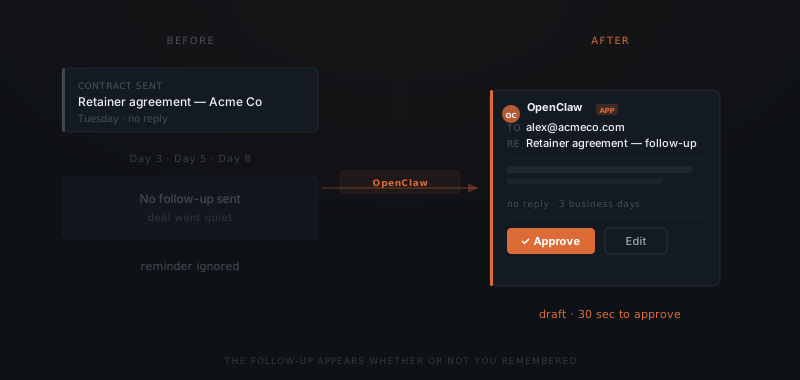
OpenClaw tracks each open contract separately. A larger retainer contract gets a different follow-up window than a standard project agreement — you set both during configuration. When a reply arrives, OpenClaw cancels the pending follow-up for that thread. Nothing lands in an active conversation.
The follow-up drafting process
OpenClaw drafts the follow-up using the context from the original contract thread — the prospect's name, the contract subject, and any terms discussed. The draft is not a generic nudge. OpenClaw produces a continuation of that specific conversation.
The follow-up addresses the prospect by name. OpenClaw references the contract directly, offers to answer questions or schedule a brief call, and sets a tone that matches the previous exchange. OpenClaw adjusts the message based on whether this is a first follow-up or a second.
If the contract is near expiry, OpenClaw flags the expiry date in the draft. You decide whether to mention it or edit the message before approving.
The approval step
The follow-up draft appears in your Slack approvals channel. OpenClaw shows the subject line, the body, the recipient, and the trigger — which contract, how many days have passed, and whether this is a first or second follow-up.
Contracts don't die. They wait for a follow-up that never came.
You approve, edit, or dismiss. Dismissing logs the draft as deferred — OpenClaw does not retry unless you have set a second follow-up window. Approving sends the message immediately. OpenClaw records the full action in the audit log.
Handling multiple open contracts
OpenClaw tracks every open contract in parallel. Ten contracts in various stages of the signing process each have their own follow-up logic running independently.
You do not configure each contract individually. OpenClaw applies the rules set during configuration — follow-up windows, message tone, second-touch behaviour — to every new contract that enters the pipeline. Adding a new contract type takes one message describing the change.
The approvals queue shows all pending follow-ups in one place. A week with five unsigned contracts surfaces five drafts, each tied to the specific thread and ready to approve or adjust.