What OpenClaw monitors
OpenClaw reads your Gmail threads and Slack messages continuously. When activity signals a deal-stage change — a prospect replies to a proposal, a contract is signed, a kickoff is confirmed — the agent drafts a CRM update and surfaces it for your approval before anything is written.
The signal-to-update mapping is configured during setup. You define which thread events correspond to which stage changes, and which CRM fields get written. A typical agency pipeline configuration looks like this:
| Signal | Moves to | Fields written |
|---|---|---|
| Prospect replies to proposal | Replied | Reply date |
| Contract signed | Closed Won | Close date, contract value |
| Kickoff call confirmed | Active | Project start date |
| No reply after follow-up sequence | Stalled | Last contact date |
| Existing client raises a new need | Expansion | Note flagged for review |
These are starting defaults adjusted on the setup call. As your pipeline evolves, the mapping is updated through ClawBuilt — not through a settings panel you manage yourself.
Which CRMs connect
CRM connectivity is agreed on the setup call. Notion databases work natively and are a common choice for teams that use Notion as their primary workspace. For dedicated CRM tools, connectivity depends on the available API and is confirmed during scoping. If your CRM does not have a direct integration, the activity log and contact records can be written to a structured Notion database as an intermediate layer.
What the approval looks like before a record is written
When a trigger event is detected, a draft CRM update surfaces in Slack. The card shows the source signal — the specific email or message — and the proposed change: which record, which fields, what values will be written.
The agent writes to your CRM only after you approve. Nothing is updated silently in the background. Every field write is visible in Slack before it happens — you see what is being changed and why, before anything touches your pipeline.
You approve, adjust a field value, or dismiss. Dismissing skips this update without affecting future triggers. If a particular signal consistently produces updates you dismiss, that is a sign the mapping needs adjusting — flag it and ClawBuilt updates the configuration.
Contact records
New contacts from inbound emails are drafted for review as they arrive. The draft includes name, email address, company, and the context of first contact — the email subject, who sent it, when.
The CRM reflects what happened in your inbox, not what you remembered to log.
Existing contacts are updated when new information appears in the thread: a job title in a signature, a company name change, a phone number in the footer. Each update is a draft surfaced for approval before it writes. OpenClaw works from Gmail and Slack data — it does not pull contacts from LinkedIn or external directories.
The daily pipeline digest
Each morning at a configured time, OpenClaw posts a pipeline summary to a Slack channel. The digest covers three things: deals that changed stage since yesterday, CRM updates currently waiting for your approval, and deals that have sat in the same stage longer than your configured threshold.
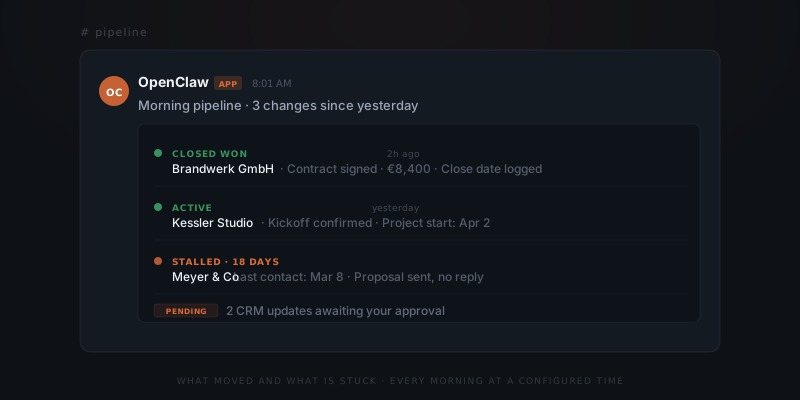
It is not a CRM export or a full pipeline view. It is a one-minute read that tells you what moved and what needs attention. The stalled deals are listed with the last contact date so you can decide whether to act or leave them.