The thirty minutes after every call
A one-hour client call costs an hour. The admin that follows costs another thirty minutes. Notes to write, action items to log, a follow-up email to send while the conversation is still fresh. Founders running five calls a week spend two and a half hours on post-call admin — before a single deliverable is touched.
The cost compounds. Skip the notes and you reconstruct the conversation from memory three days later. Delay the follow-up and the momentum from the call starts to fade. Send a vague summary and the client spends a day wondering who owns what.
Most founders know this. The notes still slip.
What OpenClaw does with a meeting transcript
OpenClaw receives the meeting transcript or voice memo — from Zoom, from a recorder app, from a dictated summary dropped into Slack — and produces three outputs: structured notes, an action item list, and a draft follow-up email.
OpenClaw formats the notes against the template defined during configuration: client name, meeting date, topics discussed, decisions made. OpenClaw extracts what was said and organises it into the structure you set — not a loose summary, a structured record.
The action item list separates what you own from what the client owns. Each item includes the responsible party and a target date where the conversation mentioned one.
The draft follow-up covers what was agreed, what the next steps are, and who owns each one. OpenClaw addresses the message to the right person and matches the subject line and tone to your previous exchanges with that client.
The approval step before anything sends
OpenClaw does not send the notes, the tasks, or the follow-up email until you approve each one. Every draft appears in your Slack approvals channel. Nothing moves until you click approve — or edit and then approve.
The approval step matters because meetings vary. A call that runs in an unexpected direction might produce a draft that needs adjusting before it reaches a client. OpenClaw surfaces the draft at the right moment, but the decision to send stays with you.
You approve each output independently. If you approve the follow-up but skip the task list, the follow-up sends and the task list stays in the queue.
What a finished output looks like
The follow-up email draft shows the full message: subject line, body, recipient, and the meeting context OpenClaw drew from. Below the draft, the action item list shows each task with its owner and any deadline the conversation mentioned.
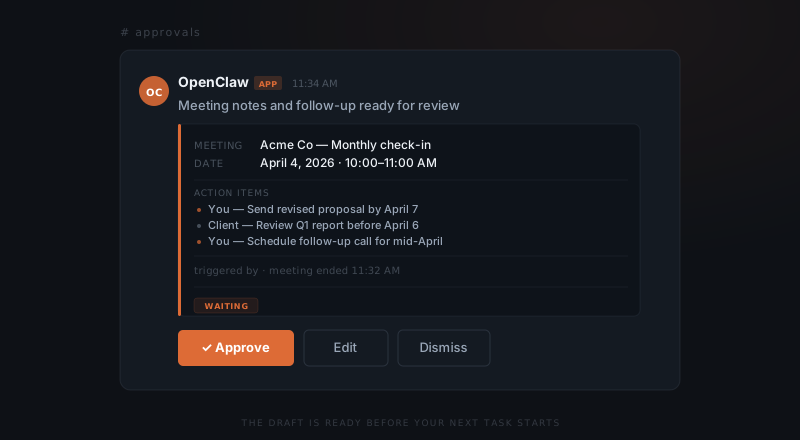
The meeting ends. The notes are already drafted.
Founders running five weekly calls recover two to three hours per week once the post-call workflow is running. The saving comes not from writing less, but from reviewing instead of composing.
Setting up OpenClaw for your call format
Setup maps to how you already run meetings. If you use Zoom, OpenClaw connects to the transcript feed directly. If you use a recorder app, you share the file or paste the transcript into a designated Slack channel. If you prefer to dictate a quick summary after a call, OpenClaw picks up the summary and structures the output.
The note template is configured during the initial setup call. Most clients have two or three meeting types — client check-ins, discovery calls, internal standups — and each gets its own output format. A discovery call produces a different structure than a monthly retainer review.
Reconfiguring a template takes one message to OpenClaw. You describe the change; OpenClaw applies the change to all future meetings of that type.